The Third-Party Logistics (3PL) Ecosystem Behind Philippine Marketplaces
Millions of Filipino consumers tap "Check Out" on Shopee and Lazada daily, eagerly waiting for the familiar beep of a courier motorcycle outside their gate. While both platforms operate proprietary delivery divisions—Shopee Xpress (SPX) and Lazada Logistics (LEX)—the sheer geographical complexity of the Philippine archipelago demands extensive partnership with established commercial couriers.
This is where Third-Party Logistics (3PL) integration with LBC Express plays an indispensable role. When an order involves heavy or bulky merchandise, cross-island maritime routing, or delivery to provincial towns and remote island municipalities outside platform-owned delivery zones, the marketplace routing algorithm frequently assigns the consignment to LBC Express.
Under platform algorithms, packages exceeding specific volumetric or weight thresholds (such as appliances, furniture, bulk dry goods, or oversized automotive equipment exceeding 50 kilograms or 100 centimeters in linear dimension) are automatically excluded from motorcycle fleets and assigned to commercial freight specialists equipped with four-wheel delivery vans and nationwide line-haul containers.
However, because e-commerce platforms and commercial carriers operate on separate software stacks, customers frequently encounter confusing status discrepancies. An order might show "Sender is preparing your parcel" in the app while the package is already traveling between regional sorting hubs, or show "Delivered" before the rider reaches the doorstep. Understanding this dual-layer tracking model is the key to stress-free shopping.
Every marketplace delivery operates on two separate tracking layers: (1) The Consumer Marketplace App layer (Shopee/Lazada UI), and (2) The Carrier Central Gateway layer (LBC internal database). When discrepancies arise, the carrier database is always the ground-truth authority.
The 4-Stage API Synchronization Pipeline: Why Status Lags Occur
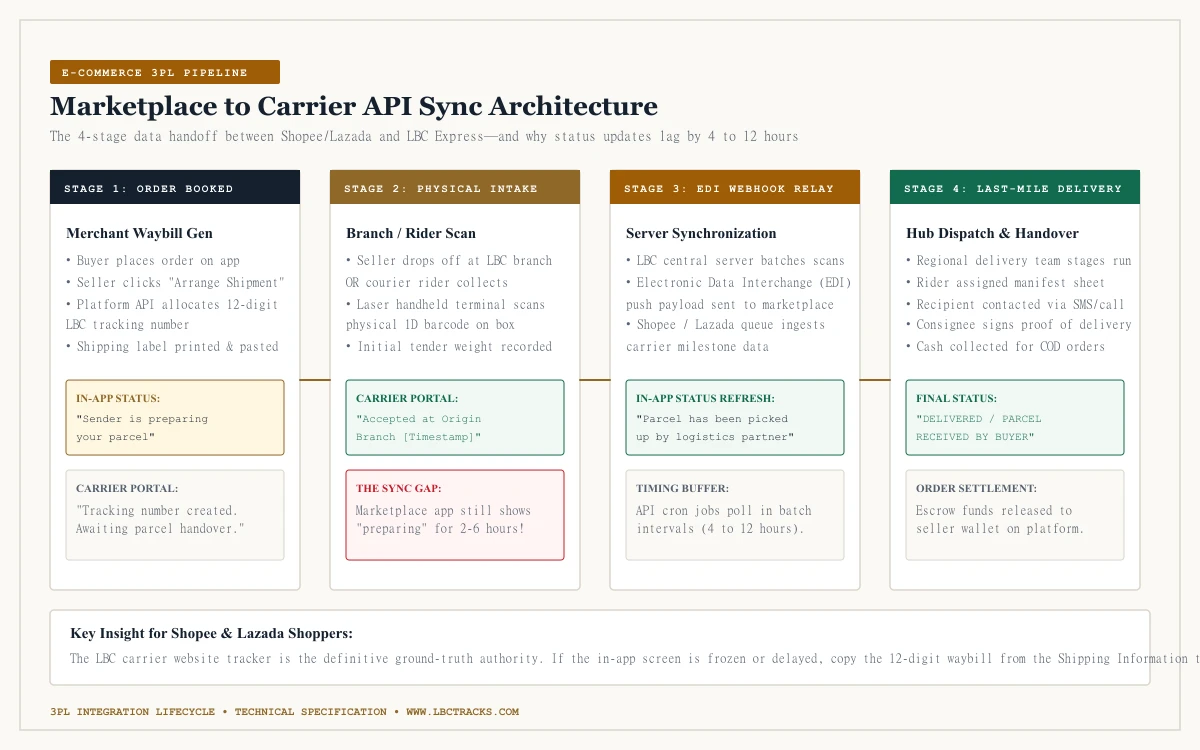
To understand why tracking updates do not appear instantly on your smartphone screen, look at the technical data pipeline connecting e-commerce platforms with carrier line-haul servers. The transmission of tracking data traverses four distinct operational stages:
Stage 1: Electronic Waybill Allocation (Digital Manifest Generation)
When a seller clicks "Arrange Shipment" inside their Seller Centre portal, the marketplace system issues an API request to LBC's server. LBC allocates an authentic 12-digit waybill number, and the seller prints an official thermal shipping label. At this stage, the order exists digitally in both systems, but the physical goods remain on the seller's packing table. In the app, this displays as "Sender is preparing your parcel."
Stage 2: Physical Intake Scan at Branch or Warehouse Pickup
The seller either drops the carton off at an LBC branch counter or an LBC pickup rider collects the batch from the merchant's warehouse. An associate scans the linear barcode using a laser handheld terminal. This intake scan immediately registers in LBC's internal database as "Accepted at Origin Branch."
For same-day dispatches, merchants observe strict branch cutoff times (typically 2:00 PM to 4:00 PM). Consignments dropped off after the afternoon shuttle consolidation cutoff are processed during the next morning's sorting run, creating a 12-hour resting window at the branch.
Stage 3: EDI Webhook Relays and Scheduled API Polling
Here lies the source of tracking lag. Carriers do not send individual API pings for every single scan among millions of daily packages; instead, data exchanges occur in scheduled batch Electronic Data Interchange (EDI) transfers or rate-limited webhook relays. Depending on platform server loads, it typically takes 4 to 12 hours for an origin intake scan to populate into your Shopee or Lazada in-app interface.
Stage 4: Regional Gateway Sorting and Last-Mile Delivery Dispatch
As the parcel moves across central distribution exchanges, air cargo transfers, and local municipal delivery hubs, each laser scan updates the carrier database in real time. Once assigned to a delivery rider's morning manifest, the status advances to "Out for Delivery" until final physical handover and signature collection.
Marketplace Order ID vs Carrier Waybill Number: Finding the Real Tracking Key
A frequent mistake made by shoppers is attempting to paste their Shopee or Lazada Order ID into an external courier tracking bar. An alphanumeric string like 241018ABCDE123 is an internal marketplace order reference; it does not exist inside LBC's logistics database.
To track your parcel on our independent portal, you must extract the official 12-digit LBC waybill number from inside your shopping app:
- Inside the Shopee App: Open the app > Tap "Me" > Select "To Receive" > Tap your active order > Click on the "Shipping Information" banner. In the top corner of the shipping breakdown, locate the Tracking Number (a 12-digit numeric code printed beside "LBC Express"). Tap the copy icon.
- Inside the Lazada App: Open the app > Tap "Account" > Select "To Receive" > Click on your order card > Tap "Delivery Details". Under the Courier section, identify the 12-digit number listed beside the LBC carrier name. Tap copy.
| Identifier Label | Example Syntax / Format | Where It Appears | Works on LBC Tracking Portal? |
|---|---|---|---|
| Shopee Order ID | 241018ABCDE123 (Alphanumeric) | Order Details top header / Invoice | NO — Internal marketplace transaction ID only |
| Lazada Order Number | 8910482910384 (13-15 Digits) | Order Confirmation email / App header | NO — E-commerce marketplace reference only |
| LBC Express Waybill Code | 1792 3481 0529 (12 Numeric Digits) | Shipping Information tab beside courier name | YES — Official universal tracking key for carrier portals |
| Seller Internal SKU / Item Ref | SKU-SHOE-BLK-42 | Product listing description / Packing slip | NO — Warehouse merchandise inventory code only |
Decoding E-Commerce Delivery Milestones and Exception Alerts
Both Shopee and Lazada use simplified status summaries that sometimes mask what is physically occurring. Here is how common in-app statuses translate to real-world logistics milestones:
"Sender is preparing your parcel" (Pre-Transit Phase)
This indicates the seller printed the waybill sticker, but the physical box has not been handed over to an LBC counter or pickup rider. If this status persists for more than three (3) business days, message the seller immediately or prepare to request an order cancellation.
"Parcel handed over to logistics partner" (Intake Scanned)
The parcel has officially entered LBC custody at the originating branch or pickup vehicle. The 12-digit waybill is now active and will return verified acceptance scans on our tracking tool.
"In Transit / Departed Sorting Facility" (Line-Haul Stage)
The parcel is moving between regional gateway exchanges. For inter-island consignments (such as Manila to Visayas or Mindanao), parcels may show zero updates for 48 to 72 hours while in maritime transit aboard roll-on/roll-off (Ro-Ro) vessels or awaiting air cargo loading.
Weekend sorting pauses can also create visual lags. While commercial trunk line-hauls operate 24/7, branch-level intake and local shuttle dispatches often slow down on Sunday afternoons, resuming full sorting velocity early Monday morning.
"Out for Delivery" (Last-Mile Staging)
The package has been loaded onto a local delivery team motorcycle or van. Deliveries typically occur between 8:00 AM and 6:00 PM. Ensure your registered mobile phone is active and capable of receiving calls or SMS.
"Delivery Attempt Failed" (Exception Event)
The driver reached your area but could not complete delivery due to recipient unavailability, severe flooding/weather, an gated subdivision access restriction, or an incomplete address. Couriers automatically re-attempt delivery on the next business day.
Peak Season Bottlenecks: Surviving Double-Day Sales (9.9, 11.11, 12.12)
During major nationwide shopping festivals—including 9.9, 10.10, 11.11, 12.12, and end-of-month payday campaigns—order volumes surge by 300% to 500% across the Philippines. This massive volume surge creates inevitable systemic delays:
- Merchant Fulfillment Delays: Sellers take 48 to 72 hours just to pack backlogged orders and hand them over to courier pickup teams.
- Airport Air Freight Caps: Commercial domestic passenger flights (Cebu Pacific, Philippine Airlines, AirAsia) carry passenger luggage first; remaining belly hold space for courier air freight is capped, creating rolling hub backlogs.
- Inter-Island Maritime Port Queues: Roll-on/roll-off cargo ferries at Manila North Harbor and Batangas Port experience extensive staging queues during holiday typhoons or heavy seasonal seas.
- Last-Mile Delivery Depot Congestion: Municipal delivery depots process triple their normal parcel intake, requiring multiple shuttle dispatches throughout the day.
During November, December, and post-campaign periods, add 2 to 4 business days to standard transit timetables. A standard Metro Manila to Visayas delivery that normally takes 3 days frequently requires 6 to 8 business days during the Christmas peak.
Troubleshooting Stalled or Failed Marketplace Deliveries
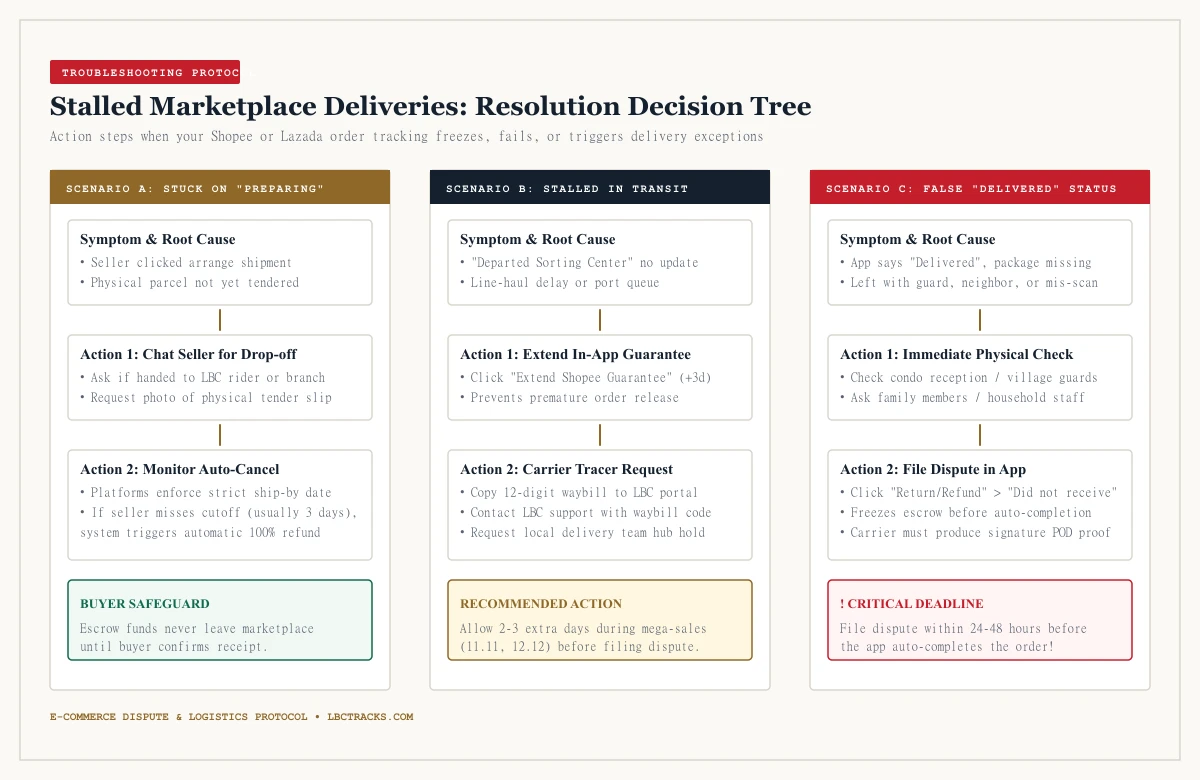
When a marketplace parcel freezes in transit or displays an unexpected error, panic is counterproductive. Follow this systematic troubleshooting protocol:
Query the 12-Digit Waybill on Carrier Portal
Copy the 12-digit number from your app and check it on lbctracks.com. The carrier portal often shows detailed milestone notes (such as "Weather hold at Batangas port" or "Staged at local branch") omitted by the simplified shopping app.
Extend In-App Buyer Protection (Freeze Escrow)
If tracking has stalled near the delivery deadline, tap "Extend Shopee Guarantee" or the Lazada equivalent. This extends the buyer protection window by three (3) days, preventing the system from automatically releasing your money to the seller.
Investigate False "Delivered" Notifications Immediately
If your app says "Delivered" but no package arrived, check immediately with condominium lobby staff, village gate guards, neighbors, or household members. Courier riders frequently leave packages with security desks if authorized.
Request Proof of Delivery (POD) Signature Snapshot
If no one accepted the parcel, contact in-app customer support within 24 hours. Request the courier's signed Proof of Delivery (POD) image to verify who signed for the handover.
File a Formal "Return/Refund" Dispute in App
If the courier cannot produce valid proof of delivery or if the item was misdelivered to an unknown address, click "Return/Refund" > "Did not receive parcel" before the protection deadline expires.
Cash on Delivery (COD) Rules and Rider Inspection Protocols
Cash on Delivery remains the dominant payment choice for Philippine e-commerce shoppers seeking peace of mind. However, many buyers misunderstand courier operating regulations regarding package unboxing:
Under standard courier operating regulations and contractual terms with e-commerce platforms, delivery riders are strictly prohibited from allowing customers to open, break the seal, or unbox a package before the cash payment is handed over.
Delivery riders are transport personnel, not product inspectors or merchant agents. If a rider allows a customer to unbox an item, and the customer rejects it due to size or color preferences, the rider is held financially liable for the open seal. To protect yourself safely under COD rules:
- Inspect the Exterior Packaging First: Check that the plastic pouch is untorn, the box is structurally intact, and the sender information matches the merchant name.
- Hand Over Payment and Collect the Carrier Receipt: Pay the exact cash amount and ensure the rider marks the transaction completed on their mobile scanner.
- Record an Unbroken Unboxing Video: Immediately upon receiving the parcel, set up your smartphone and record a continuous, unedited video showing the shipping label, the sealed seams being sliced open, and the product condition. This unboxing video serves as ironclad evidence if you must file an in-app dispute for damaged, counterfeit, or missing items.